Prototyping Theory

Reflection on "What do Prototypes Prototype?" by Stephanie Houde and Charles Hill

Marcus Thomas

Dec 21, 2024

Choosing the right kind of more focused prototype to build is an art in itself, and communicating its limited purposes to its various audiences is a critical aspect of its use.

This quote does a great job in emphasizing the challenge of aligning a prototype's purpose with the audience’s expectations. Each audience—users, designers, and stakeholders—often views a prototype through different lenses. For example, while designers may focus on functionality, stakeholders may prioritize feasibility or market readiness. By clearly defining and communicating a prototype's scope, designers can avoid any misinterpretations or crossed wires via their audience and ensure it effectively serves its purpose. Prototyping, after all, is a communicative art as well as a technical one.

The ‘SoundBrowser’ prototype...allowed a user to browse digital audio data recorded on a special personal tape recorder equipped with buttons for marking points in the audio...It was far easier to do this in a visual design tool than by programming in C.

The Sound Browser was a really interesting example to me, as it combined three dimensions—role, look and feel, and implementation—therefore making it an “integration prototype” designed for user testing. This affords a more realistic experience when prototyping, and is especially useful for a more well-rounded and comprehensive kind of user feedback. I tend to gravitate towards using digital design tools first, and seeing this example do the same was interesting to see how the team could iterate on the “look and feel” independently before integrating them into the final prototype.

Define ‘prototype’ broadly. Efficient prototypes produce answers to their designers’ most important questions in the least amount of time.

Flexibility and efficiency are core to the practice of prototyping, and I like how the authors were also able to advocate for that in this quote. I've fallen into the rookie trap of seeing my prototypes as fully fleshed-out versions of a product, which has resulted in them becoming Frankenstein-ian before, but that shouldn't be the case at all. Houde and Hill see them as fast, iterative tools for gaining specific insights. As designers, we should be seeing prototypes as a means to quickly gaining those critical insights before rolling out a full-fledged product the first time. The takeaway here is that design is iterative and practical; prototypes serve to move the project forward, even if they are ultimately disposable. Keeping this at the front of mind is crucial.

Code Breakdown

Figure 8 Track

We draw the track as a polyline (sampled points) and orient all glyphs by rotating to the tangent (rotate(p.ang)).

// Parametric curve + tangent
x = a * sin(t),  y = (b/2) * sin(2t)

function infinityPoint(tau, a, b) {
  const x = a * sin(tau);
  const y = (b * 0.5) * sin(2 * tau);
  const dx = a * cos(tau);
  const dy = b * cos(2 * tau);
  const ang = atan2(dy, dx); // tangent angle
  return { x, y, ang };
}

4-Behaviors

Seasons = Turtle feeding cycles

Fin Strokes = Distance Measuring

Breath = Religious Timing/Calendar

Blink = Day/Night Cycle

// Parametric curve + tangent
x = a * sin(t),  y = (b/2) * sin(2t)

function infinityPoint(tau, a, b) {
  const x = a * sin(tau);
  const y = (b * 0.5) * sin(2 * tau);
  const dx = a * cos(tau);
  const dy = b * cos(2 * tau);
  const ang = atan2(dy, dx); // tangent angle
  return { x, y, ang };
}

Visual Language

Track Color Season color slowly shifts via four stops using seasonalHue() and wrap-aware lerpHue()

const seasonHue = seasonalHue(seasonCyc); // amber → green → violet → cyan
stroke(seasonHue, …); drawInfinityPolyline(...);


Track Color:
Season color slowly shifts via four stops using seasonalHue() and wrap-aware lerpHue()

const seasonHue = seasonalHue(seasonCyc); // amber → green → violet → cyan
stroke(seasonHue, …); drawInfinityPolyline(...);

An image of MF DOOM's iconic mask is divided into a grid of tiles. When a button is pressed, random hidden tiles are revealed, and newly revealed tiles briefly glow in response to the sound.

revealed[r][c] = true;

Reflection

This project sits somewhere between an instrument, a game, and a piece of interactive visual art.

It asks a simple question:

What if making music wasn’t about building something new — but revealing something that already exists?

By tying sound, touch, and imagery together, the machine transforms rhythm into progress.

Sometimes, the beat isn’t the point. Sometimes, the beat is the key.

Prototyping Theory

Reflection on "What do Prototypes Prototype?" by Stephanie Houde and Charles Hill

Marcus Thomas

Dec 21, 2024

Choosing the right kind of more focused prototype to build is an art in itself, and communicating its limited purposes to its various audiences is a critical aspect of its use.

This quote does a great job in emphasizing the challenge of aligning a prototype's purpose with the audience’s expectations. Each audience—users, designers, and stakeholders—often views a prototype through different lenses. For example, while designers may focus on functionality, stakeholders may prioritize feasibility or market readiness. By clearly defining and communicating a prototype's scope, designers can avoid any misinterpretations or crossed wires via their audience and ensure it effectively serves its purpose. Prototyping, after all, is a communicative art as well as a technical one.

The ‘SoundBrowser’ prototype...allowed a user to browse digital audio data recorded on a special personal tape recorder equipped with buttons for marking points in the audio...It was far easier to do this in a visual design tool than by programming in C.

The Sound Browser was a really interesting example to me, as it combined three dimensions—role, look and feel, and implementation—therefore making it an “integration prototype” designed for user testing. This affords a more realistic experience when prototyping, and is especially useful for a more well-rounded and comprehensive kind of user feedback. I tend to gravitate towards using digital design tools first, and seeing this example do the same was interesting to see how the team could iterate on the “look and feel” independently before integrating them into the final prototype.

Define ‘prototype’ broadly. Efficient prototypes produce answers to their designers’ most important questions in the least amount of time.

Flexibility and efficiency are core to the practice of prototyping, and I like how the authors were also able to advocate for that in this quote. I've fallen into the rookie trap of seeing my prototypes as fully fleshed-out versions of a product, which has resulted in them becoming Frankenstein-ian before, but that shouldn't be the case at all. Houde and Hill see them as fast, iterative tools for gaining specific insights. As designers, we should be seeing prototypes as a means to quickly gaining those critical insights before rolling out a full-fledged product the first time. The takeaway here is that design is iterative and practical; prototypes serve to move the project forward, even if they are ultimately disposable. Keeping this at the front of mind is crucial.

Prototyping Theory

Reflection on "What do Prototypes Prototype?" by Stephanie Houde and Charles Hill

Marcus Thomas

Dec 21, 2024

Choosing the right kind of more focused prototype to build is an art in itself, and communicating its limited purposes to its various audiences is a critical aspect of its use.

This quote does a great job in emphasizing the challenge of aligning a prototype's purpose with the audience’s expectations. Each audience—users, designers, and stakeholders—often views a prototype through different lenses. For example, while designers may focus on functionality, stakeholders may prioritize feasibility or market readiness. By clearly defining and communicating a prototype's scope, designers can avoid any misinterpretations or crossed wires via their audience and ensure it effectively serves its purpose. Prototyping, after all, is a communicative art as well as a technical one.

The ‘SoundBrowser’ prototype...allowed a user to browse digital audio data recorded on a special personal tape recorder equipped with buttons for marking points in the audio...It was far easier to do this in a visual design tool than by programming in C.

The Sound Browser was a really interesting example to me, as it combined three dimensions—role, look and feel, and implementation—therefore making it an “integration prototype” designed for user testing. This affords a more realistic experience when prototyping, and is especially useful for a more well-rounded and comprehensive kind of user feedback. I tend to gravitate towards using digital design tools first, and seeing this example do the same was interesting to see how the team could iterate on the “look and feel” independently before integrating them into the final prototype.

Define ‘prototype’ broadly. Efficient prototypes produce answers to their designers’ most important questions in the least amount of time.

Flexibility and efficiency are core to the practice of prototyping, and I like how the authors were also able to advocate for that in this quote. I've fallen into the rookie trap of seeing my prototypes as fully fleshed-out versions of a product, which has resulted in them becoming Frankenstein-ian before, but that shouldn't be the case at all. Houde and Hill see them as fast, iterative tools for gaining specific insights. As designers, we should be seeing prototypes as a means to quickly gaining those critical insights before rolling out a full-fledged product the first time. The takeaway here is that design is iterative and practical; prototypes serve to move the project forward, even if they are ultimately disposable. Keeping this at the front of mind is crucial.

Process

Physical Interface

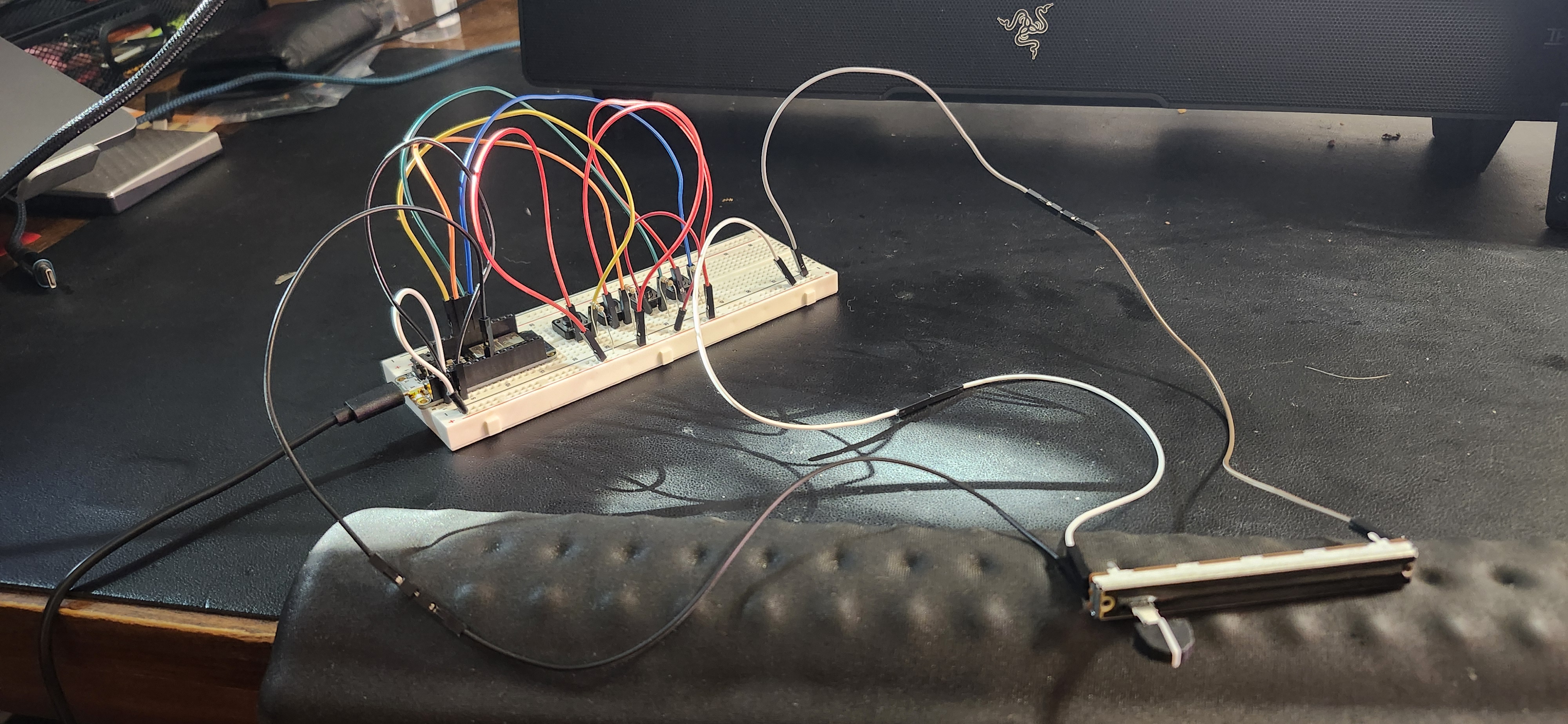
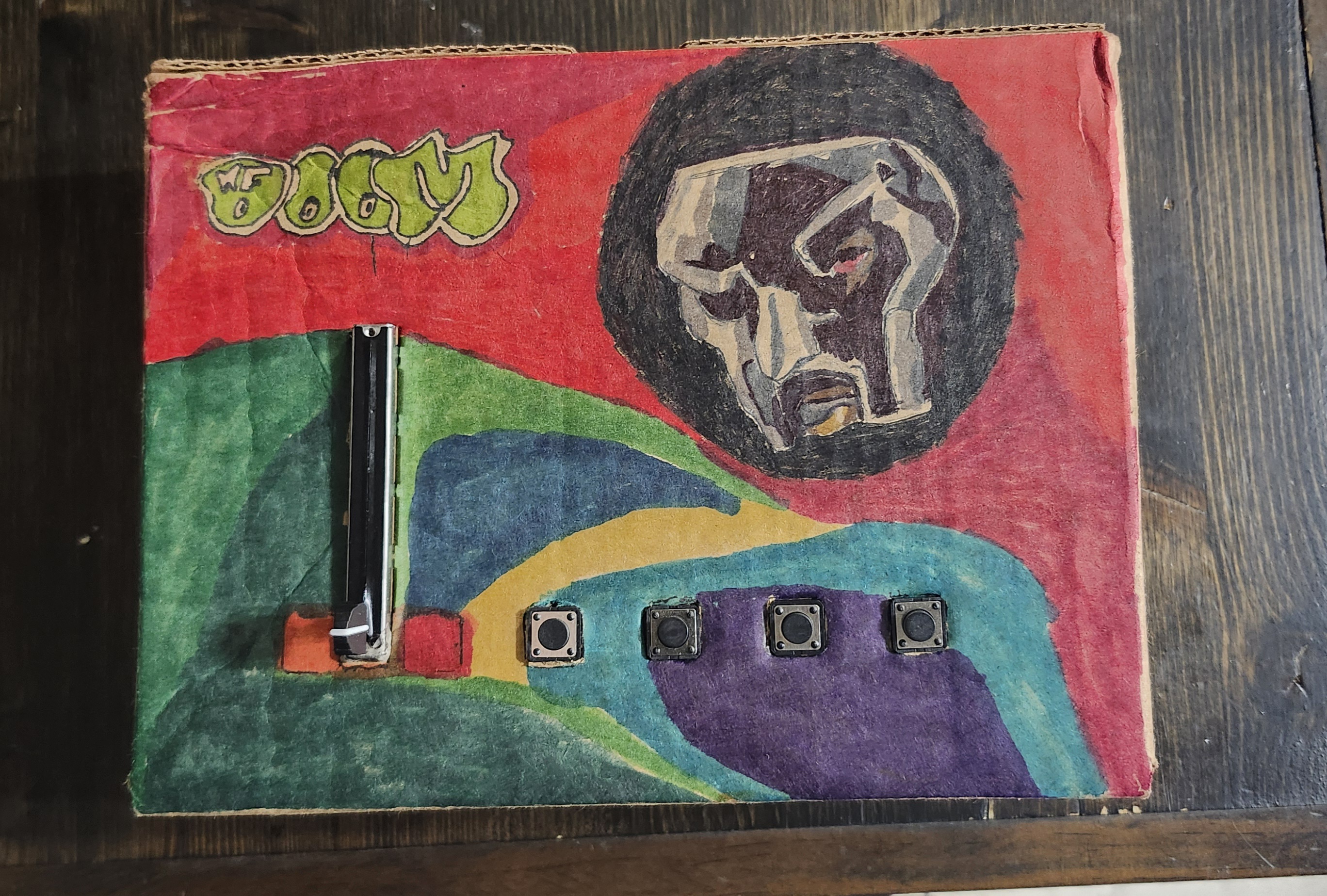
At the heart of the system is a custom-built controller powered by an Arduino ESP32 Feather housed in a cardboard enclosure.

The interface includes:

  • Four physical buttons
    • Each button triggers a different sound sample and reveals tiles from a specific region of the image.
  • One slide potentiometer
    • The slider controls pitch, shifting the musical mood from low and heavy to sharp and elevated. It also acts as a modifier, changing how the sounds feel without changing how they’re played.

Breadboard with inputs

Full view + Slide Potentiometer

DOOMBOX Exterior Housing

Arduino IDE: Reading the Interface

On the hardware side, the ESP32 reads four buttons and a B10K slide potentiometer. Each loop, it sends their values as a single line of comma-separated data over USB serial.

#define B1 13
#define B2 12
#define B3 27
#define B4 33
#define POT_PIN 32

void loop() {
  Serial.print(digitalRead(B1));
  Serial.print(',');
  Serial.print(digitalRead(B2));
  Serial.print(',');
  Serial.print(digitalRead(B3));
  Serial.print(',');
  Serial.print(digitalRead(B4));
  Serial.print(',');
  Serial.println(analogRead(POT_PIN));
}

Processing: Sound Playback and Pitch Control

In Processing, serial data is parsed and mapped to musical behavior. Each button triggers a drum sample, while the slider controls pitch by adjusting playback rate.

pitchRate = map(potRaw, 0, 4095, 0.5, 2.0);
pitchRate = constrain(pitchRate, 0.5, 2.0);

drums[i].rate(pitchRate);
drums[i].play();

Processing: Image Reveal

An image of MF DOOM's iconic mask is divided into a grid of tiles. When a button is pressed, random hidden tiles are revealed, and newly revealed tiles briefly glow in response to the sound.

revealed[r][c] = true;

Processing: Image Reveal

On the hardware side, the ESP32 reads four buttons and a B10K slide potentiometer. Each loop, it sends their values as a single line of comma-separated data over USB serial.

#define B1 13
#define B2 12
#define B3 27
#define B4 33
#define POT_PIN 32

void loop() {
  Serial.print(digitalRead(B1));
  Serial.print(',');
  Serial.print(digitalRead(B2));
  Serial.print(',');
  Serial.print(digitalRead(B3));
  Serial.print(',');
  Serial.print(digitalRead(B4));
  Serial.print(',');
  Serial.println(analogRead(POT_PIN));
}

Reflection

This project sits somewhere between an instrument, a game, and a piece of interactive visual art.

It asks a simple question:

What if making music wasn’t about building something new — but revealing something that already exists?

By tying sound, touch, and imagery together, the machine transforms rhythm into progress.

Sometimes, the beat isn’t the point. Sometimes, the beat is the key.

Logic be Dammed:
Representing Forces and Nature in Code

Reflection on "What do Prototypes Prototype?" by Stephanie Houde and Charles Hill

Marcus Thomas

Dec 21, 2024

Choosing the right kind of more focused prototype to build is an art in itself, and communicating its limited purposes to its various audiences is a critical aspect of its use.

This quote does a great job in emphasizing the challenge of aligning a prototype's purpose with the audience’s expectations. Each audience—users, designers, and stakeholders—often views a prototype through different lenses. For example, while designers may focus on functionality, stakeholders may prioritize feasibility or market readiness. By clearly defining and communicating a prototype's scope, designers can avoid any misinterpretations or crossed wires via their audience and ensure it effectively serves its purpose. Prototyping, after all, is a communicative art as well as a technical one.

The ‘SoundBrowser’ prototype...allowed a user to browse digital audio data recorded on a special personal tape recorder equipped with buttons for marking points in the audio...It was far easier to do this in a visual design tool than by programming in C.

The Sound Browser was a really interesting example to me, as it combined three dimensions—role, look and feel, and implementation—therefore making it an “integration prototype” designed for user testing. This affords a more realistic experience when prototyping, and is especially useful for a more well-rounded and comprehensive kind of user feedback. I tend to gravitate towards using digital design tools first, and seeing this example do the same was interesting to see how the team could iterate on the “look and feel” independently before integrating them into the final prototype.

Define ‘prototype’ broadly. Efficient prototypes produce answers to their designers’ most important questions in the least amount of time.

Flexibility and efficiency are core to the practice of prototyping, and I like how the authors were also able to advocate for that in this quote. I've fallen into the rookie trap of seeing my prototypes as fully fleshed-out versions of a product, which has resulted in them becoming Frankenstein-ian before, but that shouldn't be the case at all. Houde and Hill see them as fast, iterative tools for gaining specific insights. As designers, we should be seeing prototypes as a means to quickly gaining those critical insights before rolling out a full-fledged product the first time. The takeaway here is that design is iterative and practical; prototypes serve to move the project forward, even if they are ultimately disposable. Keeping this at the front of mind is crucial.

Code Breakdown

Classes

  • Hydro – tile grids for water, target, age, barren; column arrays for velCol, noiseCol
    • Builds trunk + branches with Perlin noise and stochastic jitter.
    • Spawns new estuaries on a timer; widens old undammed channels; applies right-side desiccation and water-adjacent recovery.
  • Forest – 2D fields for willow and aspen (0–1). Growth moves toward a cap reduced by barren; blocked under lodges; harvest() does a ring search for richest patch.
  • DamSpans – spans are {row, cL, cR, integrity} across a gap bounded by land. Integrity decays with time and high flow; collapsed spans are removed.
  • Colony, Beaver – array of agents; mortality filter; metrics; per-beaver FSM with vector steering.
  • Lodge – simple sprite; count tied to population

Making the world

Why this order: environment first, then resources, then structures that shape flow, then agents reacting to the current state.

Creates subsystems and enforces the following update order (water → resources → structures → agents).

class World {
  constructor(hud){
    this.hud=hud;
    this.hydro=new Hydro(hud);
    this.forest=new Forest(hud,this.hydro);
    this.dams=new DamSpans(hud,this.hydro);
    this.colony=new Colony(hud,this.hydro,this.dams,this.forest);
    this.lodges=[]; this.updateLodges(true);
  }
  update(){
    this.hydro.update();                     // rivers grow/branch/widen/dry
    this.forest.update(this.lodges,this.hydro); // growth capped by barren
    this.dams.update(this.hydro);            // span decay vs flow
    this.colony.update(this.dams,this.hydro);    // FSM + mortality
    if (this.colony.prunedThisTick){ this.updateLodges(); this.colony.prunedThisTick=false; }
    this.forest.blockUnderLodges(this.lodges,this.hydro);
  }
}

Rivers

The simulation starts with building a target river tree (trunk + noisy branches), reveals it over time (slider), then keep it alive with estuaries, widening, and right-side desiccation.

Beavers “feel” water via noiseCol[c] (stress driver).

regen(){
  this.water=grid(false); this.target=grid(false); this.barren=grid(0); this.growth=0;
  const trunk = walkBranch(2, rows*0.5, cols*0.85, 0, true); paintPath(trunk,5);
  for (let i=0;i<10;i++){ const pC=rand(6,cols*0.7), pR=clamp(noise(i*.3)*rows,2,rows-3);
    paintPath(walkBranch(pC,pR,rand(18,48), coin()?-1:+1,false),3);
  }
}
update(){
  // reveal target → water
  this.growth=min(1,(this.growth||0)+(0.002+hud.get("riverSpeed")*0.02));
  for (let c=0;c<floor(cols*this.growth);c++) for (let r=0;r<rows;r++) if (target[c][r]) water[c][r]=true;

  // desiccate far right → barren land
  for (let c=floor(cols*.75); c<cols; c++) if (random()<0.0008)
    for (let r=0;r<rows;r++) if (water[c][r]){ water[c][r]=target[c][r]=false; barren[c][r]=min(1,barren[c][r]+.4); }

  // estuaries & widening (if undammed & old)
  if (++branchTimer>240){ branchTimer=0; /* spawn small branch from wet pivot; paintPath(...,2) */ }
  // …age water; leak to neighbors when age>180 && !damSpans.hasDamNear(c,r,4)

  recalcColumns(); // sets velCol[], noiseCol[] from wet fraction per column
}

Forests & Barren Tiles

Willows (for building dams) and Aspen (food for the beavers) grow on land toward a cap that shrinks with barren; growth is blocked under lodges and zeroed on water.The simulation starts with building a target river tree (trunk + noisy branches), reveals it over time (slider), then keep it alive with estuaries, widening, and right-side desiccation.

Resulting effects: near water → fertile patches; dry right side → patchy, low-cap growth.

regen(){
  this.water=grid(false); this.target=grid(false); this.barren=grid(0); this.growth=0;
  const trunk = walkBranch(2, rows*0.5, cols*0.85, 0, true); paintPath(trunk,5);
  for (let i=0;i<10;i++){ const pC=rand(6,cols*0.7), pR=clamp(noise(i*.3)*rows,2,rows-3);
    paintPath(walkBranch(pC,pR,rand(18,48), coin()?-1:+1,false),3);
  }
}
update(){
  // reveal target → water
  this.growth=min(1,(this.growth||0)+(0.002+hud.get("riverSpeed")*0.02));
  for (let c=0;c<floor(cols*this.growth);c++) for (let r=0;r<rows;r++) if (target[c][r]) water[c][r]=true;

  // desiccate far right → barren land
  for (let c=floor(cols*.75); c<cols; c++) if (random()<0.0008)
    for (let r=0;r<rows;r++) if (water[c][r]){ water[c][r]=target[c][r]=false; barren[c][r]=min(1,barren[c][r]+.4); }

  // estuaries & widening (if undammed & old)
  if (++branchTimer>240){ branchTimer=0; /* spawn small branch from wet pivot; paintPath(...,2) */ }
  // …age water; leak to neighbors when age>180 && !damSpans.hasDamNear(c,r,4)

  recalcColumns(); // sets velCol[], noiseCol[] from wet fraction per column
}

Dams & Bank-to-Bank Spans

Dam Spans exist only across contiguous water segments bounded by land; integrity increases with work and decays with flow.

This prevents the beavers from spam building, and makes dams visually & mechanically legible.

regen(){
  this.water=grid(false); this.target=grid(false); this.barren=grid(0); this.growth=0;
  const trunk = walkBranch(2, rows*0.5, cols*0.85, 0, true); paintPath(trunk,5);
  for (let i=0;i<10;i++){ const pC=rand(6,cols*0.7), pR=clamp(noise(i*.3)*rows,2,rows-3);
    paintPath(walkBranch(pC,pR,rand(18,48), coin()?-1:+1,false),3);
  }
}
update(){
  // reveal target → water
  this.growth=min(1,(this.growth||0)+(0.002+hud.get("riverSpeed")*0.02));
  for (let c=0;c<floor(cols*this.growth);c++) for (let r=0;r<rows;r++) if (target[c][r]) water[c][r]=true;

  // desiccate far right → barren land
  for (let c=floor(cols*.75); c<cols; c++) if (random()<0.0008)
    for (let r=0;r<rows;r++) if (water[c][r]){ water[c][r]=target[c][r]=false; barren[c][r]=min(1,barren[c][r]+.4); }

  // estuaries & widening (if undammed & old)
  if (++branchTimer>240){ branchTimer=0; /* spawn small branch from wet pivot; paintPath(...,2) */ }
  // …age water; leak to neighbors when age>180 && !damSpans.hasDamNear(c,r,4)

  recalcColumns(); // sets velCol[], noiseCol[] from wet fraction per column
}

Agents & Interaction: Beavers, Vectors, HUD

Beavers are need-driven agents with vector steering.

Input from the right-side menu allows the user to shape conditions.

regen(){
  this.water=grid(false); this.target=grid(false); this.barren=grid(0); this.growth=0;
  const trunk = walkBranch(2, rows*0.5, cols*0.85, 0, true); paintPath(trunk,5);
  for (let i=0;i<10;i++){ const pC=rand(6,cols*0.7), pR=clamp(noise(i*.3)*rows,2,rows-3);
    paintPath(walkBranch(pC,pR,rand(18,48), coin()?-1:+1,false),3);
  }
}
update(){
  // reveal target → water
  this.growth=min(1,(this.growth||0)+(0.002+hud.get("riverSpeed")*0.02));
  for (let c=0;c<floor(cols*this.growth);c++) for (let r=0;r<rows;r++) if (target[c][r]) water[c][r]=true;

  // desiccate far right → barren land
  for (let c=floor(cols*.75); c<cols; c++) if (random()<0.0008)
    for (let r=0;r<rows;r++) if (water[c][r]){ water[c][r]=target[c][r]=false; barren[c][r]=min(1,barren[c][r]+.4); }

  // estuaries & widening (if undammed & old)
  if (++branchTimer>240){ branchTimer=0; /* spawn small branch from wet pivot; paintPath(...,2) */ }
  // …age water; leak to neighbors when age>180 && !damSpans.hasDamNear(c,r,4)

  recalcColumns(); // sets velCol[], noiseCol[] from wet fraction per column
}

Input & HUD

  • Keys: G generate new river; SPACE pause.
  • Mouse: Left = plant Willow, Shift+Left = plant Aspen; toggle Spawn Mode then Right-click to add a random beaver.
  • Sliders (stacked under descriptions; buttons below sliders—no overlap):
    1. River Creation Speed → reveal rate of Hydro.target
    2. Food Spawn Rate (Aspen) → forest growth term
    3. Building Material Spawn Rate (Willow) → forest growth term
    4. Dam Building Speed → per-action span integrity

This closes the system loop: environment drives needs; agents act; structures reshape the environment; HUD lets you adjust parameters and watch new equilibria emerge.

Logic be Dammed:
Representing Forces and Nature in Code

Reflection on "What do Prototypes Prototype?" by Stephanie Houde and Charles Hill

Marcus Thomas

Dec 21, 2024

Choosing the right kind of more focused prototype to build is an art in itself, and communicating its limited purposes to its various audiences is a critical aspect of its use.

This quote does a great job in emphasizing the challenge of aligning a prototype's purpose with the audience’s expectations. Each audience—users, designers, and stakeholders—often views a prototype through different lenses. For example, while designers may focus on functionality, stakeholders may prioritize feasibility or market readiness. By clearly defining and communicating a prototype's scope, designers can avoid any misinterpretations or crossed wires via their audience and ensure it effectively serves its purpose. Prototyping, after all, is a communicative art as well as a technical one.

The ‘SoundBrowser’ prototype...allowed a user to browse digital audio data recorded on a special personal tape recorder equipped with buttons for marking points in the audio...It was far easier to do this in a visual design tool than by programming in C.

The Sound Browser was a really interesting example to me, as it combined three dimensions—role, look and feel, and implementation—therefore making it an “integration prototype” designed for user testing. This affords a more realistic experience when prototyping, and is especially useful for a more well-rounded and comprehensive kind of user feedback. I tend to gravitate towards using digital design tools first, and seeing this example do the same was interesting to see how the team could iterate on the “look and feel” independently before integrating them into the final prototype.

Define ‘prototype’ broadly. Efficient prototypes produce answers to their designers’ most important questions in the least amount of time.

Flexibility and efficiency are core to the practice of prototyping, and I like how the authors were also able to advocate for that in this quote. I've fallen into the rookie trap of seeing my prototypes as fully fleshed-out versions of a product, which has resulted in them becoming Frankenstein-ian before, but that shouldn't be the case at all. Houde and Hill see them as fast, iterative tools for gaining specific insights. As designers, we should be seeing prototypes as a means to quickly gaining those critical insights before rolling out a full-fledged product the first time. The takeaway here is that design is iterative and practical; prototypes serve to move the project forward, even if they are ultimately disposable. Keeping this at the front of mind is crucial.

Code Breakdown

Classes

  • Hydro – tile grids for water, target, age, barren; column arrays for velCol, noiseCol
    • Builds trunk + branches with Perlin noise and stochastic jitter.
    • Spawns new estuaries on a timer; widens old undammed channels; applies right-side desiccation and water-adjacent recovery.
  • Forest – 2D fields for willow and aspen (0–1). Growth moves toward a cap reduced by barren; blocked under lodges; harvest() does a ring search for richest patch.
  • DamSpans – spans are {row, cL, cR, integrity} across a gap bounded by land. Integrity decays with time and high flow; collapsed spans are removed.
  • Colony, Beaver – array of agents; mortality filter; metrics; per-beaver FSM with vector steering.
  • Lodge – simple sprite; count tied to population

Making the world

Why this order: environment first, then resources, then structures that shape flow, then agents reacting to the current state.

Creates subsystems and enforces the following update order (water → resources → structures → agents).

class World {
  constructor(hud){
    this.hud=hud;
    this.hydro=new Hydro(hud);
    this.forest=new Forest(hud,this.hydro);
    this.dams=new DamSpans(hud,this.hydro);
    this.colony=new Colony(hud,this.hydro,this.dams,this.forest);
    this.lodges=[]; this.updateLodges(true);
  }
  update(){
    this.hydro.update();                     // rivers grow/branch/widen/dry
    this.forest.update(this.lodges,this.hydro); // growth capped by barren
    this.dams.update(this.hydro);            // span decay vs flow
    this.colony.update(this.dams,this.hydro);    // FSM + mortality
    if (this.colony.prunedThisTick){ this.updateLodges(); this.colony.prunedThisTick=false; }
    this.forest.blockUnderLodges(this.lodges,this.hydro);
  }
}

Rivers

The simulation starts with building a target river tree (trunk + noisy branches), reveals it over time (slider), then keep it alive with estuaries, widening, and right-side desiccation.

Beavers “feel” water via noiseCol[c] (stress driver).

regen(){
  this.water=grid(false); this.target=grid(false); this.barren=grid(0); this.growth=0;
  const trunk = walkBranch(2, rows*0.5, cols*0.85, 0, true); paintPath(trunk,5);
  for (let i=0;i<10;i++){ const pC=rand(6,cols*0.7), pR=clamp(noise(i*.3)*rows,2,rows-3);
    paintPath(walkBranch(pC,pR,rand(18,48), coin()?-1:+1,false),3);
  }
}
update(){
  // reveal target → water
  this.growth=min(1,(this.growth||0)+(0.002+hud.get("riverSpeed")*0.02));
  for (let c=0;c<floor(cols*this.growth);c++) for (let r=0;r<rows;r++) if (target[c][r]) water[c][r]=true;

  // desiccate far right → barren land
  for (let c=floor(cols*.75); c<cols; c++) if (random()<0.0008)
    for (let r=0;r<rows;r++) if (water[c][r]){ water[c][r]=target[c][r]=false; barren[c][r]=min(1,barren[c][r]+.4); }

  // estuaries & widening (if undammed & old)
  if (++branchTimer>240){ branchTimer=0; /* spawn small branch from wet pivot; paintPath(...,2) */ }
  // …age water; leak to neighbors when age>180 && !damSpans.hasDamNear(c,r,4)

  recalcColumns(); // sets velCol[], noiseCol[] from wet fraction per column
}

Forests & Barren Tiles

Willows (for building dams) and Aspen (food for the beavers) grow on land toward a cap that shrinks with barren; growth is blocked under lodges and zeroed on water.The simulation starts with building a target river tree (trunk + noisy branches), reveals it over time (slider), then keep it alive with estuaries, widening, and right-side desiccation.

Resulting effects: near water → fertile patches; dry right side → patchy, low-cap growth.

regen(){
  this.water=grid(false); this.target=grid(false); this.barren=grid(0); this.growth=0;
  const trunk = walkBranch(2, rows*0.5, cols*0.85, 0, true); paintPath(trunk,5);
  for (let i=0;i<10;i++){ const pC=rand(6,cols*0.7), pR=clamp(noise(i*.3)*rows,2,rows-3);
    paintPath(walkBranch(pC,pR,rand(18,48), coin()?-1:+1,false),3);
  }
}
update(){
  // reveal target → water
  this.growth=min(1,(this.growth||0)+(0.002+hud.get("riverSpeed")*0.02));
  for (let c=0;c<floor(cols*this.growth);c++) for (let r=0;r<rows;r++) if (target[c][r]) water[c][r]=true;

  // desiccate far right → barren land
  for (let c=floor(cols*.75); c<cols; c++) if (random()<0.0008)
    for (let r=0;r<rows;r++) if (water[c][r]){ water[c][r]=target[c][r]=false; barren[c][r]=min(1,barren[c][r]+.4); }

  // estuaries & widening (if undammed & old)
  if (++branchTimer>240){ branchTimer=0; /* spawn small branch from wet pivot; paintPath(...,2) */ }
  // …age water; leak to neighbors when age>180 && !damSpans.hasDamNear(c,r,4)

  recalcColumns(); // sets velCol[], noiseCol[] from wet fraction per column
}

Dams & Bank-to-Bank Spans

Dam Spans exist only across contiguous water segments bounded by land; integrity increases with work and decays with flow.

This prevents the beavers from spam building, and makes dams visually & mechanically legible.

regen(){
  this.water=grid(false); this.target=grid(false); this.barren=grid(0); this.growth=0;
  const trunk = walkBranch(2, rows*0.5, cols*0.85, 0, true); paintPath(trunk,5);
  for (let i=0;i<10;i++){ const pC=rand(6,cols*0.7), pR=clamp(noise(i*.3)*rows,2,rows-3);
    paintPath(walkBranch(pC,pR,rand(18,48), coin()?-1:+1,false),3);
  }
}
update(){
  // reveal target → water
  this.growth=min(1,(this.growth||0)+(0.002+hud.get("riverSpeed")*0.02));
  for (let c=0;c<floor(cols*this.growth);c++) for (let r=0;r<rows;r++) if (target[c][r]) water[c][r]=true;

  // desiccate far right → barren land
  for (let c=floor(cols*.75); c<cols; c++) if (random()<0.0008)
    for (let r=0;r<rows;r++) if (water[c][r]){ water[c][r]=target[c][r]=false; barren[c][r]=min(1,barren[c][r]+.4); }

  // estuaries & widening (if undammed & old)
  if (++branchTimer>240){ branchTimer=0; /* spawn small branch from wet pivot; paintPath(...,2) */ }
  // …age water; leak to neighbors when age>180 && !damSpans.hasDamNear(c,r,4)

  recalcColumns(); // sets velCol[], noiseCol[] from wet fraction per column
}

Agents & Interaction: Beavers, Vectors, HUD

Beavers are need-driven agents with vector steering.

Input from the right-side menu allows the user to shape conditions.

regen(){
  this.water=grid(false); this.target=grid(false); this.barren=grid(0); this.growth=0;
  const trunk = walkBranch(2, rows*0.5, cols*0.85, 0, true); paintPath(trunk,5);
  for (let i=0;i<10;i++){ const pC=rand(6,cols*0.7), pR=clamp(noise(i*.3)*rows,2,rows-3);
    paintPath(walkBranch(pC,pR,rand(18,48), coin()?-1:+1,false),3);
  }
}
update(){
  // reveal target → water
  this.growth=min(1,(this.growth||0)+(0.002+hud.get("riverSpeed")*0.02));
  for (let c=0;c<floor(cols*this.growth);c++) for (let r=0;r<rows;r++) if (target[c][r]) water[c][r]=true;

  // desiccate far right → barren land
  for (let c=floor(cols*.75); c<cols; c++) if (random()<0.0008)
    for (let r=0;r<rows;r++) if (water[c][r]){ water[c][r]=target[c][r]=false; barren[c][r]=min(1,barren[c][r]+.4); }

  // estuaries & widening (if undammed & old)
  if (++branchTimer>240){ branchTimer=0; /* spawn small branch from wet pivot; paintPath(...,2) */ }
  // …age water; leak to neighbors when age>180 && !damSpans.hasDamNear(c,r,4)

  recalcColumns(); // sets velCol[], noiseCol[] from wet fraction per column
}

Input & HUD

  • Keys: G generate new river; SPACE pause.
  • Mouse: Left = plant Willow, Shift+Left = plant Aspen; toggle Spawn Mode then Right-click to add a random beaver.
  • Sliders (stacked under descriptions; buttons below sliders—no overlap):
    1. River Creation Speed → reveal rate of Hydro.target
    2. Food Spawn Rate (Aspen) → forest growth term
    3. Building Material Spawn Rate (Willow) → forest growth term
    4. Dam Building Speed → per-action span integrity

This closes the system loop: environment drives needs; agents act; structures reshape the environment; HUD lets you adjust parameters and watch new equilibria emerge.

Logic be Dammed:
Representing Forces and Nature in Code

Reflection on "What do Prototypes Prototype?" by Stephanie Houde and Charles Hill

Marcus Thomas

Dec 21, 2024

Choosing the right kind of more focused prototype to build is an art in itself, and communicating its limited purposes to its various audiences is a critical aspect of its use.

This quote does a great job in emphasizing the challenge of aligning a prototype's purpose with the audience’s expectations. Each audience—users, designers, and stakeholders—often views a prototype through different lenses. For example, while designers may focus on functionality, stakeholders may prioritize feasibility or market readiness. By clearly defining and communicating a prototype's scope, designers can avoid any misinterpretations or crossed wires via their audience and ensure it effectively serves its purpose. Prototyping, after all, is a communicative art as well as a technical one.

The ‘SoundBrowser’ prototype...allowed a user to browse digital audio data recorded on a special personal tape recorder equipped with buttons for marking points in the audio...It was far easier to do this in a visual design tool than by programming in C.

The Sound Browser was a really interesting example to me, as it combined three dimensions—role, look and feel, and implementation—therefore making it an “integration prototype” designed for user testing. This affords a more realistic experience when prototyping, and is especially useful for a more well-rounded and comprehensive kind of user feedback. I tend to gravitate towards using digital design tools first, and seeing this example do the same was interesting to see how the team could iterate on the “look and feel” independently before integrating them into the final prototype.

Define ‘prototype’ broadly. Efficient prototypes produce answers to their designers’ most important questions in the least amount of time.

Flexibility and efficiency are core to the practice of prototyping, and I like how the authors were also able to advocate for that in this quote. I've fallen into the rookie trap of seeing my prototypes as fully fleshed-out versions of a product, which has resulted in them becoming Frankenstein-ian before, but that shouldn't be the case at all. Houde and Hill see them as fast, iterative tools for gaining specific insights. As designers, we should be seeing prototypes as a means to quickly gaining those critical insights before rolling out a full-fledged product the first time. The takeaway here is that design is iterative and practical; prototypes serve to move the project forward, even if they are ultimately disposable. Keeping this at the front of mind is crucial.

Code Breakdown

Classes

  • Hydro – tile grids for water, target, age, barren; column arrays for velCol, noiseCol
    • Builds trunk + branches with Perlin noise and stochastic jitter.
    • Spawns new estuaries on a timer; widens old undammed channels; applies right-side desiccation and water-adjacent recovery.
  • Forest – 2D fields for willow and aspen (0–1). Growth moves toward a cap reduced by barren; blocked under lodges; harvest() does a ring search for richest patch.
  • DamSpans – spans are {row, cL, cR, integrity} across a gap bounded by land. Integrity decays with time and high flow; collapsed spans are removed.
  • Colony, Beaver – array of agents; mortality filter; metrics; per-beaver FSM with vector steering.
  • Lodge – simple sprite; count tied to population

Making the world

Why this order: environment first, then resources, then structures that shape flow, then agents reacting to the current state.

Creates subsystems and enforces the following update order (water → resources → structures → agents).

class World {
  constructor(hud){
    this.hud=hud;
    this.hydro=new Hydro(hud);
    this.forest=new Forest(hud,this.hydro);
    this.dams=new DamSpans(hud,this.hydro);
    this.colony=new Colony(hud,this.hydro,this.dams,this.forest);
    this.lodges=[]; this.updateLodges(true);
  }
  update(){
    this.hydro.update();                     // rivers grow/branch/widen/dry
    this.forest.update(this.lodges,this.hydro); // growth capped by barren
    this.dams.update(this.hydro);            // span decay vs flow
    this.colony.update(this.dams,this.hydro);    // FSM + mortality
    if (this.colony.prunedThisTick){ this.updateLodges(); this.colony.prunedThisTick=false; }
    this.forest.blockUnderLodges(this.lodges,this.hydro);
  }
}

Rivers

The simulation starts with building a target river tree (trunk + noisy branches), reveals it over time (slider), then keep it alive with estuaries, widening, and right-side desiccation.

Beavers “feel” water via noiseCol[c] (stress driver).

regen(){
  this.water=grid(false); this.target=grid(false); this.barren=grid(0); this.growth=0;
  const trunk = walkBranch(2, rows*0.5, cols*0.85, 0, true); paintPath(trunk,5);
  for (let i=0;i<10;i++){ const pC=rand(6,cols*0.7), pR=clamp(noise(i*.3)*rows,2,rows-3);
    paintPath(walkBranch(pC,pR,rand(18,48), coin()?-1:+1,false),3);
  }
}
update(){
  // reveal target → water
  this.growth=min(1,(this.growth||0)+(0.002+hud.get("riverSpeed")*0.02));
  for (let c=0;c<floor(cols*this.growth);c++) for (let r=0;r<rows;r++) if (target[c][r]) water[c][r]=true;

  // desiccate far right → barren land
  for (let c=floor(cols*.75); c<cols; c++) if (random()<0.0008)
    for (let r=0;r<rows;r++) if (water[c][r]){ water[c][r]=target[c][r]=false; barren[c][r]=min(1,barren[c][r]+.4); }

  // estuaries & widening (if undammed & old)
  if (++branchTimer>240){ branchTimer=0; /* spawn small branch from wet pivot; paintPath(...,2) */ }
  // …age water; leak to neighbors when age>180 && !damSpans.hasDamNear(c,r,4)

  recalcColumns(); // sets velCol[], noiseCol[] from wet fraction per column
}

Forests & Barren Tiles

Willows (for building dams) and Aspen (food for the beavers) grow on land toward a cap that shrinks with barren; growth is blocked under lodges and zeroed on water.The simulation starts with building a target river tree (trunk + noisy branches), reveals it over time (slider), then keep it alive with estuaries, widening, and right-side desiccation.

Resulting effects: near water → fertile patches; dry right side → patchy, low-cap growth.

regen(){
  this.water=grid(false); this.target=grid(false); this.barren=grid(0); this.growth=0;
  const trunk = walkBranch(2, rows*0.5, cols*0.85, 0, true); paintPath(trunk,5);
  for (let i=0;i<10;i++){ const pC=rand(6,cols*0.7), pR=clamp(noise(i*.3)*rows,2,rows-3);
    paintPath(walkBranch(pC,pR,rand(18,48), coin()?-1:+1,false),3);
  }
}
update(){
  // reveal target → water
  this.growth=min(1,(this.growth||0)+(0.002+hud.get("riverSpeed")*0.02));
  for (let c=0;c<floor(cols*this.growth);c++) for (let r=0;r<rows;r++) if (target[c][r]) water[c][r]=true;

  // desiccate far right → barren land
  for (let c=floor(cols*.75); c<cols; c++) if (random()<0.0008)
    for (let r=0;r<rows;r++) if (water[c][r]){ water[c][r]=target[c][r]=false; barren[c][r]=min(1,barren[c][r]+.4); }

  // estuaries & widening (if undammed & old)
  if (++branchTimer>240){ branchTimer=0; /* spawn small branch from wet pivot; paintPath(...,2) */ }
  // …age water; leak to neighbors when age>180 && !damSpans.hasDamNear(c,r,4)

  recalcColumns(); // sets velCol[], noiseCol[] from wet fraction per column
}

Dams & Bank-to-Bank Spans

Dam Spans exist only across contiguous water segments bounded by land; integrity increases with work and decays with flow.

This prevents the beavers from spam building, and makes dams visually & mechanically legible.

regen(){
  this.water=grid(false); this.target=grid(false); this.barren=grid(0); this.growth=0;
  const trunk = walkBranch(2, rows*0.5, cols*0.85, 0, true); paintPath(trunk,5);
  for (let i=0;i<10;i++){ const pC=rand(6,cols*0.7), pR=clamp(noise(i*.3)*rows,2,rows-3);
    paintPath(walkBranch(pC,pR,rand(18,48), coin()?-1:+1,false),3);
  }
}
update(){
  // reveal target → water
  this.growth=min(1,(this.growth||0)+(0.002+hud.get("riverSpeed")*0.02));
  for (let c=0;c<floor(cols*this.growth);c++) for (let r=0;r<rows;r++) if (target[c][r]) water[c][r]=true;

  // desiccate far right → barren land
  for (let c=floor(cols*.75); c<cols; c++) if (random()<0.0008)
    for (let r=0;r<rows;r++) if (water[c][r]){ water[c][r]=target[c][r]=false; barren[c][r]=min(1,barren[c][r]+.4); }

  // estuaries & widening (if undammed & old)
  if (++branchTimer>240){ branchTimer=0; /* spawn small branch from wet pivot; paintPath(...,2) */ }
  // …age water; leak to neighbors when age>180 && !damSpans.hasDamNear(c,r,4)

  recalcColumns(); // sets velCol[], noiseCol[] from wet fraction per column
}

Agents & Interaction: Beavers, Vectors, HUD

Beavers are need-driven agents with vector steering.

Input from the right-side menu allows the user to shape conditions.

regen(){
  this.water=grid(false); this.target=grid(false); this.barren=grid(0); this.growth=0;
  const trunk = walkBranch(2, rows*0.5, cols*0.85, 0, true); paintPath(trunk,5);
  for (let i=0;i<10;i++){ const pC=rand(6,cols*0.7), pR=clamp(noise(i*.3)*rows,2,rows-3);
    paintPath(walkBranch(pC,pR,rand(18,48), coin()?-1:+1,false),3);
  }
}
update(){
  // reveal target → water
  this.growth=min(1,(this.growth||0)+(0.002+hud.get("riverSpeed")*0.02));
  for (let c=0;c<floor(cols*this.growth);c++) for (let r=0;r<rows;r++) if (target[c][r]) water[c][r]=true;

  // desiccate far right → barren land
  for (let c=floor(cols*.75); c<cols; c++) if (random()<0.0008)
    for (let r=0;r<rows;r++) if (water[c][r]){ water[c][r]=target[c][r]=false; barren[c][r]=min(1,barren[c][r]+.4); }

  // estuaries & widening (if undammed & old)
  if (++branchTimer>240){ branchTimer=0; /* spawn small branch from wet pivot; paintPath(...,2) */ }
  // …age water; leak to neighbors when age>180 && !damSpans.hasDamNear(c,r,4)

  recalcColumns(); // sets velCol[], noiseCol[] from wet fraction per column
}

Input & HUD

  • Keys: G generate new river; SPACE pause.
  • Mouse: Left = plant Willow, Shift+Left = plant Aspen; toggle Spawn Mode then Right-click to add a random beaver.
  • Sliders (stacked under descriptions; buttons below sliders—no overlap):
    1. River Creation Speed → reveal rate of Hydro.target
    2. Food Spawn Rate (Aspen) → forest growth term
    3. Building Material Spawn Rate (Willow) → forest growth term
    4. Dam Building Speed → per-action span integrity

This closes the system loop: environment drives needs; agents act; structures reshape the environment; HUD lets you adjust parameters and watch new equilibria emerge.

Logic be Dammed:
Representing Forces and Nature in Code

Reflection on "What do Prototypes Prototype?" by Stephanie Houde and Charles Hill

Marcus Thomas

Dec 21, 2024

Choosing the right kind of more focused prototype to build is an art in itself, and communicating its limited purposes to its various audiences is a critical aspect of its use.

This quote does a great job in emphasizing the challenge of aligning a prototype's purpose with the audience’s expectations. Each audience—users, designers, and stakeholders—often views a prototype through different lenses. For example, while designers may focus on functionality, stakeholders may prioritize feasibility or market readiness. By clearly defining and communicating a prototype's scope, designers can avoid any misinterpretations or crossed wires via their audience and ensure it effectively serves its purpose. Prototyping, after all, is a communicative art as well as a technical one.

The ‘SoundBrowser’ prototype...allowed a user to browse digital audio data recorded on a special personal tape recorder equipped with buttons for marking points in the audio...It was far easier to do this in a visual design tool than by programming in C.

The Sound Browser was a really interesting example to me, as it combined three dimensions—role, look and feel, and implementation—therefore making it an “integration prototype” designed for user testing. This affords a more realistic experience when prototyping, and is especially useful for a more well-rounded and comprehensive kind of user feedback. I tend to gravitate towards using digital design tools first, and seeing this example do the same was interesting to see how the team could iterate on the “look and feel” independently before integrating them into the final prototype.

Define ‘prototype’ broadly. Efficient prototypes produce answers to their designers’ most important questions in the least amount of time.

Flexibility and efficiency are core to the practice of prototyping, and I like how the authors were also able to advocate for that in this quote. I've fallen into the rookie trap of seeing my prototypes as fully fleshed-out versions of a product, which has resulted in them becoming Frankenstein-ian before, but that shouldn't be the case at all. Houde and Hill see them as fast, iterative tools for gaining specific insights. As designers, we should be seeing prototypes as a means to quickly gaining those critical insights before rolling out a full-fledged product the first time. The takeaway here is that design is iterative and practical; prototypes serve to move the project forward, even if they are ultimately disposable. Keeping this at the front of mind is crucial.

Code Breakdown

Classes

  • Hydro – tile grids for water, target, age, barren; column arrays for velCol, noiseCol
    • Builds trunk + branches with Perlin noise and stochastic jitter.
    • Spawns new estuaries on a timer; widens old undammed channels; applies right-side desiccation and water-adjacent recovery.
  • Forest – 2D fields for willow and aspen (0–1). Growth moves toward a cap reduced by barren; blocked under lodges; harvest() does a ring search for richest patch.
  • DamSpans – spans are {row, cL, cR, integrity} across a gap bounded by land. Integrity decays with time and high flow; collapsed spans are removed.
  • Colony, Beaver – array of agents; mortality filter; metrics; per-beaver FSM with vector steering.
  • Lodge – simple sprite; count tied to population

Making the world

Why this order: environment first, then resources, then structures that shape flow, then agents reacting to the current state.

Creates subsystems and enforces the following update order (water → resources → structures → agents).

class World {
  constructor(hud){
    this.hud=hud;
    this.hydro=new Hydro(hud);
    this.forest=new Forest(hud,this.hydro);
    this.dams=new DamSpans(hud,this.hydro);
    this.colony=new Colony(hud,this.hydro,this.dams,this.forest);
    this.lodges=[]; this.updateLodges(true);
  }
  update(){
    this.hydro.update();                     // rivers grow/branch/widen/dry
    this.forest.update(this.lodges,this.hydro); // growth capped by barren
    this.dams.update(this.hydro);            // span decay vs flow
    this.colony.update(this.dams,this.hydro);    // FSM + mortality
    if (this.colony.prunedThisTick){ this.updateLodges(); this.colony.prunedThisTick=false; }
    this.forest.blockUnderLodges(this.lodges,this.hydro);
  }
}

Rivers

The simulation starts with building a target river tree (trunk + noisy branches), reveals it over time (slider), then keep it alive with estuaries, widening, and right-side desiccation.

Beavers “feel” water via noiseCol[c] (stress driver).

regen(){
  this.water=grid(false); this.target=grid(false); this.barren=grid(0); this.growth=0;
  const trunk = walkBranch(2, rows*0.5, cols*0.85, 0, true); paintPath(trunk,5);
  for (let i=0;i<10;i++){ const pC=rand(6,cols*0.7), pR=clamp(noise(i*.3)*rows,2,rows-3);
    paintPath(walkBranch(pC,pR,rand(18,48), coin()?-1:+1,false),3);
  }
}
update(){
  // reveal target → water
  this.growth=min(1,(this.growth||0)+(0.002+hud.get("riverSpeed")*0.02));
  for (let c=0;c<floor(cols*this.growth);c++) for (let r=0;r<rows;r++) if (target[c][r]) water[c][r]=true;

  // desiccate far right → barren land
  for (let c=floor(cols*.75); c<cols; c++) if (random()<0.0008)
    for (let r=0;r<rows;r++) if (water[c][r]){ water[c][r]=target[c][r]=false; barren[c][r]=min(1,barren[c][r]+.4); }

  // estuaries & widening (if undammed & old)
  if (++branchTimer>240){ branchTimer=0; /* spawn small branch from wet pivot; paintPath(...,2) */ }
  // …age water; leak to neighbors when age>180 && !damSpans.hasDamNear(c,r,4)

  recalcColumns(); // sets velCol[], noiseCol[] from wet fraction per column
}

Forests & Barren Tiles

Willows (for building dams) and Aspen (food for the beavers) grow on land toward a cap that shrinks with barren; growth is blocked under lodges and zeroed on water.The simulation starts with building a target river tree (trunk + noisy branches), reveals it over time (slider), then keep it alive with estuaries, widening, and right-side desiccation.

Resulting effects: near water → fertile patches; dry right side → patchy, low-cap growth.

regen(){
  this.water=grid(false); this.target=grid(false); this.barren=grid(0); this.growth=0;
  const trunk = walkBranch(2, rows*0.5, cols*0.85, 0, true); paintPath(trunk,5);
  for (let i=0;i<10;i++){ const pC=rand(6,cols*0.7), pR=clamp(noise(i*.3)*rows,2,rows-3);
    paintPath(walkBranch(pC,pR,rand(18,48), coin()?-1:+1,false),3);
  }
}
update(){
  // reveal target → water
  this.growth=min(1,(this.growth||0)+(0.002+hud.get("riverSpeed")*0.02));
  for (let c=0;c<floor(cols*this.growth);c++) for (let r=0;r<rows;r++) if (target[c][r]) water[c][r]=true;

  // desiccate far right → barren land
  for (let c=floor(cols*.75); c<cols; c++) if (random()<0.0008)
    for (let r=0;r<rows;r++) if (water[c][r]){ water[c][r]=target[c][r]=false; barren[c][r]=min(1,barren[c][r]+.4); }

  // estuaries & widening (if undammed & old)
  if (++branchTimer>240){ branchTimer=0; /* spawn small branch from wet pivot; paintPath(...,2) */ }
  // …age water; leak to neighbors when age>180 && !damSpans.hasDamNear(c,r,4)

  recalcColumns(); // sets velCol[], noiseCol[] from wet fraction per column
}

Dams & Bank-to-Bank Spans

Dam Spans exist only across contiguous water segments bounded by land; integrity increases with work and decays with flow.

This prevents the beavers from spam building, and makes dams visually & mechanically legible.

regen(){
  this.water=grid(false); this.target=grid(false); this.barren=grid(0); this.growth=0;
  const trunk = walkBranch(2, rows*0.5, cols*0.85, 0, true); paintPath(trunk,5);
  for (let i=0;i<10;i++){ const pC=rand(6,cols*0.7), pR=clamp(noise(i*.3)*rows,2,rows-3);
    paintPath(walkBranch(pC,pR,rand(18,48), coin()?-1:+1,false),3);
  }
}
update(){
  // reveal target → water
  this.growth=min(1,(this.growth||0)+(0.002+hud.get("riverSpeed")*0.02));
  for (let c=0;c<floor(cols*this.growth);c++) for (let r=0;r<rows;r++) if (target[c][r]) water[c][r]=true;

  // desiccate far right → barren land
  for (let c=floor(cols*.75); c<cols; c++) if (random()<0.0008)
    for (let r=0;r<rows;r++) if (water[c][r]){ water[c][r]=target[c][r]=false; barren[c][r]=min(1,barren[c][r]+.4); }

  // estuaries & widening (if undammed & old)
  if (++branchTimer>240){ branchTimer=0; /* spawn small branch from wet pivot; paintPath(...,2) */ }
  // …age water; leak to neighbors when age>180 && !damSpans.hasDamNear(c,r,4)

  recalcColumns(); // sets velCol[], noiseCol[] from wet fraction per column
}

Agents & Interaction: Beavers, Vectors, HUD

Beavers are need-driven agents with vector steering.

Input from the right-side menu allows the user to shape conditions.

regen(){
  this.water=grid(false); this.target=grid(false); this.barren=grid(0); this.growth=0;
  const trunk = walkBranch(2, rows*0.5, cols*0.85, 0, true); paintPath(trunk,5);
  for (let i=0;i<10;i++){ const pC=rand(6,cols*0.7), pR=clamp(noise(i*.3)*rows,2,rows-3);
    paintPath(walkBranch(pC,pR,rand(18,48), coin()?-1:+1,false),3);
  }
}
update(){
  // reveal target → water
  this.growth=min(1,(this.growth||0)+(0.002+hud.get("riverSpeed")*0.02));
  for (let c=0;c<floor(cols*this.growth);c++) for (let r=0;r<rows;r++) if (target[c][r]) water[c][r]=true;

  // desiccate far right → barren land
  for (let c=floor(cols*.75); c<cols; c++) if (random()<0.0008)
    for (let r=0;r<rows;r++) if (water[c][r]){ water[c][r]=target[c][r]=false; barren[c][r]=min(1,barren[c][r]+.4); }

  // estuaries & widening (if undammed & old)
  if (++branchTimer>240){ branchTimer=0; /* spawn small branch from wet pivot; paintPath(...,2) */ }
  // …age water; leak to neighbors when age>180 && !damSpans.hasDamNear(c,r,4)

  recalcColumns(); // sets velCol[], noiseCol[] from wet fraction per column
}

Input & HUD

  • Keys: G generate new river; SPACE pause.
  • Mouse: Left = plant Willow, Shift+Left = plant Aspen; toggle Spawn Mode then Right-click to add a random beaver.
  • Sliders (stacked under descriptions; buttons below sliders—no overlap):
    1. River Creation Speed → reveal rate of Hydro.target
    2. Food Spawn Rate (Aspen) → forest growth term
    3. Building Material Spawn Rate (Willow) → forest growth term
    4. Dam Building Speed → per-action span integrity

This closes the system loop: environment drives needs; agents act; structures reshape the environment; HUD lets you adjust parameters and watch new equilibria emerge.